Friday, April 02, 2021

The Easiest Boxes Prank....

I had an idea early in AQ's history. I no longer remember precisely when the idea first occurred to me, but it was probably within a few years of starting Atlas Quest: A way that AQ could measure your chance of finding a specific letterbox.

It was a real idea, but I never ran with it. I mentioned it to a few close friends over the years more as a curiosity--the ideas that never happened--but I deliberately never posted about the idea publicly since I was sure it would be controversial and why start a controversy if I had no intention of implementing it?

Rozebud and geckospot, shocked by the April Fools prank!

The idea appealed to me greatly on an intellectual level. I was curious how accurate I could make such a feature. Theoretically, it wouldn't be hard to run a statistical analysis on a box and determine how likely a specific person would be to find a given box. Depending on how many variables are checked for, the math can get a little ugly. From an intellectual standpoint, the problem ranked up there with the traveling salesman program. I wanted to do it for fun! =)

But I didn't. And not just because I thought it would be controversial. Anyone who's been on AQ for a bit knows I've pushed on with controversial features if I thought the benefits would outweigh the negatives. (Or, more likely, I didn't think the supposed negatives weren't as bad as people imagined they would be--and always knew I could undo a feature if I turned out to be gloriously wrong.)

Nope, the reason I never implemented it was that I never thought it would work. Atlas Quest is a small little website, a micro-site in the vastness of the Internet, and it doesn't have a lot of data about boxes. The average box only has a handful of finds, and is lucky to have more than a couple of attempts recorded. How could I accurately determine the "findability" of a box with such a small sample set? Unless hundreds of thousands of people started using AQ on a daily basis, there would probably never be enough data to make the necessary calculations that could be both accurate and reasonably precise.

So I never implemented it. It was a dead end not even worth trying.

Photo by thunderbird.

 Fast forward to earlier this week, and I needed an April Fools Day joke. I always have a few ideas in mind, and often times, I wind up choosing one based on how much time I have available to implement it. In this case, I had less than a week to throw something together.

And this old idea I had for a real feature, I felt, had some potential. I could finally implement my idea! Of course, it would never work, but that was okay--it was an April Fools joke, after all. It didn't have to work!

And a few days ago, I sat down and spent a couple of hours hacking out an algorithm for classifying boxes by "findability." It wasn't a complex algorithm. I just wanted something that, with a passing glace, appeared to be legit. So I used things like the status of the box, how many strikes it had, how long it had been since it was found, etc., to group boxes into easy, average, hard and impossible groups. Box is unavailable or retired? Impossible group! Box was active, planted yesterday and had no strikes? Easy!

Then I pulled up about a hundred listings to see how well the results turned out. It didn't have to be perfect--just something that didn't look totally random. 

But it turned out perfect. I was absolutely stunned looking through the boxes. Box after box, I mentally calculated where I would have classified it with the information available on AQ database, and my algorithm--box after box--put it in the exact same category. It was a little spooky.

And not funny. Not funny at all.... This wasn't an April Fool prank anymore. It was a real feature! Crap. The joke was on me!

The joke was also on Angel Winks
when she woke up in the morning, but I'll talk
about that later....

What to do? What to do?

Wassa--my right hand advisor for all things April Fools--suggested that I just sabotage the results and randomly throw boxes in various groups.

But I thought of another way to sabotage the results--make the different groups look and sound more-or-less the same. All of the categories would be some degree of "easy". And that's the road I started heading down.

There were several layers for this prank I had had in mind, and I wasn't sure I would have them all ready before April Fools, but that was okay. I'd just launch the joke with whatever I had completed. So the first step I did was just list results--calculated on the fly--on the box details page. That had been my proof of concept that went so terribly, terribly wrong.

The second layer was to show the results on a page of search results--so one could glance through a lot of boxes to identify the easiest finds. This took a lot more work on my part. I needed to calculate the groupings ahead of time and store them in the database to be looked up when needed. It could calculate the groupings for boxes one at a time fast enough, but a search results with hundreds of results... no, that would be too slow. They needed to be calculated ahead of time and stored in the database.

So I did that, got it all working.

I just love it when things just "work." =)
Photo by Travel'n Turtle

Powered by the database now, I could add additional layers of "functionality". I could let people run searches based on the box's findability. I could add a widget to calculate the "easiest" box to find within a certain area. 

The data in the database was actually very real, but the results AQ displayed were sometimes a little.... fake? Is that the right word? Yes, I think that's a good description of the situation.

For instance, the high degree of precision on the box details page (e.g. 99.8352% ±89.84%) were totally made up. I gave a ridiculous number of decimal points with a range so wide that it would be completely worthless. Although I needed to make sure the numbers for "incredibly easy" boxes would be higher than "super easy" boxes, and those would be higher than "very easy" boxes, which would be higher than the mere "easy" boxes. So I subtracted 10% of easiness every time the group went down a level. But the decimal points were pure random.

The widget to show the easiest box on AQ as well as one's home area was, perhaps, a bit misleading. AQ did divide boxes into 4 categories, but within a category, there was no ranking--so there was no "easiest" box to identify. Instead, I had it pick a box at random from the "incredibly easy" category. Wassa suggested that I modify it a bit and have it pick a box that people have attempted but never found just to mess with them. Excellent idea! Although I added an additional requirement that the box still needed to be active. So I tweaked the "home area" results to do that, which pleased me to no end when people pointed out on the message boards that it was sending them to boxes that they had already tried to find but that they "knew" they were missing. =)

Memere titled this photo "Late night antics."
Late night antics indeed.... =)

As far as jokes go, though, it was one of the dumber ones I've created. I really needed to "sell" the joke well, and that's what I spent all evening on March 31st working on: the Easiest Boxes on Atlas Quest post. I mixed a lot of fiction in with few actual facts, and tried to think of anything funny that I could add.

That list of factors used in the "complex calculations"... the first three entries in that list were actually real. The rest of them I spent the better part of an hour making up. It didn't matter if the idea was preposterous and impractical to implement even if I wanted to--if it sounded like it could have any effect at all on the chances of someone finding a box, I included it.

After finishing the text of the post--and there was a lot of text--I wanted some pictures to break it up and make it look pretty. What kind of photos did I have? Screenshots of the feature didn't seem like the right way to go with it. Ah ha! I know! A few months ago, I created a special photo album asking for photos that I could use on AQ. I should take a gander at those. That's what I created the album for, after all!

The gag, of course, was basically promising that every box you looked for would be "easy," so I focused on the images of people showing successful finds. There were a lot of good candidates, but I ended up choosing two photos from Angel Winks (here and here). And although I wasn't looking for it, I saw the inky fingers photo by Wise Wanderer and thought that would be a nice change from just people finding boxes.

And while adding that photo to the post, I got the idea to add a fake testimonial, which tied in nicely with the photo. Perfect! It looked awesome! =)
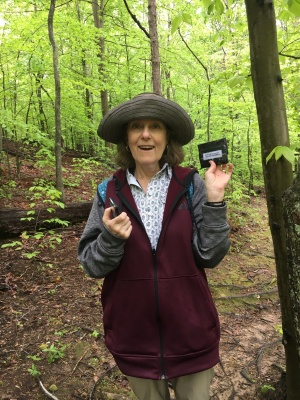
Mosaic Butterfly found the missing 'box!
For those of you who missed Mosaic Butterfly's fake
endorsement on AQ's home page, this was the photo I used.
I think it said something like "I can't believe it really works!"

I was a little concerned that--although they submitted the photos to the photo gallery for use on AQ--perhaps they might not like the idea of it being used with fake testimonials or implying an actual endorsement of the new feature on AQ, so I quickly wrote them AQ mail pulling them in on the joke. By this point, there were only a couple of hours until midnight when the prank would go live. Angel Winks lives a couple of timezones ahead of me--she could already be asleep and not even know I've used her photos until she wakes up in the morning! I crossed my fingers and hoped she'd be okay with it. It wasn't as late for Wise Wanderer, but it was still late. I felt pretty sure that they wouldn't mind my using the photos, but I was ready to remove them if they sent me irate messages in the morning telling them they did not approve of how I used them

After that was done, I realized that there was no announcement for anyone coming into AQ through the home page. I figured I should add a new section to announce the new feature, then headed back to the photo gallery to look for a photo that would fit well, and this photo hit the jackpot. =) Perfect! It needed another fake testimonial too. After getting that added, I hurriedly send Mosaic Butterfly a message to formally welcome her into the conspiracy as well. =)

And then.... By the time I was ready to say everything was done, I had about an hour to wait until midnight. So I killed some time watching YouTube videos and counting down the minutes.

Most of the features were set to automatically start working the second midnight struck, but a few items I had to manually set up. The new widget, for instance, I needed to run a line in the database to make sure it got added to everyone's My Page setup. But I also discovered that the theme was changing randomly! I had put that in to run on April 1st as a placeholder last December thinking I'd create some sort of theme for April Fools, but then I had forgotten to take it out when I ended up not creating a special theme for the day. Drats! So if any of you had been on AQ within a few minutes after midnight, you would have seen the theme change with every page load. If anyone noticed, they didn't post about it--for which I was thankful. =) 

On a related note, that random-theme them was the first April Fools joke I ever played on AQ, and I've used it a few other years the day after April Fools to mark the end of a joke. It wasn't supposed to run at all this year, though.

I had to check for gremlins in the night....
Photo by Super Hedge Hoggie

I poked around the website, trying all the features making sure they were all working correctly. I found a couple of issues if someone tried to access the new features but weren't logged into an account. Minor bugs in the code that were never found since I didn't create unit tests to check these changes. (I tend not to make unit tests for code that I know will only run for a single day and isn't particularly complicated.) So I spent several more minutes fixing bugs--but so far as I can tell, nobody found them before I was able to fix them.

After everything was all set and done, I watched a couple of more YouTube videos to kill some more time. I was dead tired but didn't dare to go sleep yet for a couple of reasons: (1) in case somebody discovered a bug, I wanted to fix it and (2) I wanted to see who would comment on the joke first and what they had to say. Lame? Great? Hilarious? Stupid?

But by 1:30am, I couldn't keep my eyelids open anymore and finally called it a night.

I slept in particularly late. After being up so late at night, I slept in late too. Time to check up on how the April Fools joke was going over....

And... it was okay. =) Not great, not bad, but okay.... More or less what I expected out of it.

What would everyone be doing while
I got some much needed rest? DrCAWatson
appeared to keep on boxing....


But there was still one last joke to play.... to announce that this feature is actually real! Not the version that ran on April Fools Day, of course. I deliberately sabotaged those results for that day. But the data in the database was actually pretty good data and I wanted to give it life. Seems like a waste just to throw it away. That hadn't been my intention when I first ran with this joke, but that's what it turned into!

So I've dismantled the fake widget and fake results. I've rename the categories into their proper descriptions of easy, average, hard and impossible. (To be fair, it's not so much a measure of how difficult the boxes are to find, but more about the likelihood about the chances of finding it. But "findability" seemed like a weird word to describe the feature, but maybe it's a better name for it?) 

And I know there are some people who would prefer not to see this information, so you really can remove the "difficulty" of a box from search results and box listings in your letterbox & search preferences. When I announced that on the message boards, it because that was real.

But I like the feature. Not so much for trying to decide whether I should look for a box or not, but it just gives me a sense of the likelihood of whether the box is there or not which I tend to do anyhow. The status isn't always accurate since listings are often abandoned, attempts aren't always accurate since they can be recorded on boxes that are still in place, and the length of time since the box has last been visited doesn't tell you anything about whether the box is still there or not. There's not really a perfect way to determine the viability of a box--but combining all those discrete pieces of data gives me a ballpark idea of what to expect without having to individually check all the discrete pieces of data manually. I like it. =)

It's the April Fool's Day prank that lived!

I'm pretty sure that even Essex Explorers's kids like
April Fools more than Christmas. (Right?)

And I'm going to explain exactly the algorithm AQ uses to determine which difficulty level to assign to a box. By knowing exactly how the algorithm works, you can decide for yourself if the results are something you might find useful. If they aren't, you can ignore the option in your preferences.

But I can imagine that some people might be upset if their box ends up being categorized as "hard" or "impossible" even though they checked up on the box just yesterday and it's perfectly fine. So knowing how the algorithm works also allows you to better manipulate how your own boxes show up.

So, here's how the calculations are made. Internally, the categories are stored as easy, average, hard or impossible, so four possible categories.

  1. All boxes start as easy.
  2. If the box has an unknown status, it'll be moved to average
  3. If the box has an unavailable or retired status, it'll be moved to impossible.
  4. If the box has one strike, it'll be downgraded to average. (If it's already at average or below, it will not be downgraded further.)
  5. If the box has two or three strikes, it'll be downgraded to hard. (If it's already at hard or impossible, it will not be downgraded further.)
  6. If the box has not been found for at least one year, it will be downgraded one level--but not down to impossible.
  7. If the box has not been found for at least five years, it will be downgraded an additional level--but not down to impossible.

And that's it. You'll find that a box can never be classified as "impossible" unless it has a status of unavailable or retired. That's the only thing that will move the box to the "impossible" category.

If I had to guess, the most controversial part of the algorithm is that I use the last found date at all to determine if a box is viable, but I figure even if a box IS still there after 5 years, it's okay to mark it as "hard" because after that much time, there's a good chance that significant landmarks could have changed if it's a long hike, and a significant chance it really did go missing if it were in an urban environment. So boxes without a find for at least 5 years will always be labeled as hard.

But... you also have indirect control over which category your boxes fall into. A maintenance visit, for instance, counts as a "find" as far as AQ is concerned, so you could just record a maintenance visit to remove the "old last found" penalty. Ideally, you'd go out in person to check the box and make sure the clues are up-to-date and fresh, but that's not a requirement. Recording a maintenance visit can also reset the strike count back to 0, which removes the strike penalty as well.

After that, the only thing left affecting the difficulty of the box is its status--which you, again, have full control over.

Anyhow, I hope some of you find the feature helpful. Not simply to decide which boxes to look for or giving you a ballpark idea of the likelihood that the box is findable, but even for which boxes of your own that, perhaps, you should check up on.

And hey! Have you enjoyed the photos on this blog post? Want to, perhaps, see your own photos used someday? Then be sure to submit them to the Letterboxing Photos for AQ gallery! That's where I grabbed all these photos from. (That photo album, I think, is the best idea I had all year!)

Happy trails!

You might think this is part of an April Fools Day joke, but you'd be wrong.
It's just another letterbox adventure for AdventurousAcorn. =)

Thursday, April 01, 2021

April Fools: A short history

Yes, it is that time of year again, as most of you quickly figured out, and once again, AQ could not go a year without some sort of shenanigans to celebrate the day. It's a yearly tradition that has been happening every year since 2006. That year, it was a small event, where random themes would be used every time you loaded a page. 

In 2007, it was another small prank--this time, introducing a slew of new icons. At the time, AQ still felt very new and people were constantly suggesting new icons. I included some of the real suggestions among the fake icons, but some of them were clearly ridiculous. It was meant more as a joke. I didn't think anyone would really believe that I would entertain the idea of adding such a massive number of icons. It would have been so unwieldy! People wouldn't even be able to remember what all of them meant! And a number of the icons were just so absurd. (Dinosaur crossing? Really?) Nobody would really think it was a real feature.

But many people did.... much to my surprise!

So the next year, in 2008, I came up with a ridiculous idea... but could sound somewhat plausible. I figured if the previous year's implausible idea fooled people, a plausible idea could fool a lot of people!

So I pondered the most horrible thing that could happen to letterboxing--the stuff that would give people nightmares if it were true. What if... AQ joined forces with McDonald's to promote letterboxing as a fun and healthy activity for children?

I'd create a McDonald's-based theme and make a grand announcement. That was it. Relatively simple and easy. I swung the idea by Wassa for his thoughts. Even then, I knew he was a gold mine of ideas when it came to pranks. And he did not approve of the idea at all! "No," he told me, "this is definitely not acceptable. It must be bigger! Much bigger!"

Then he followed up with: "We can do much better."

We...? Somehow, I lost control of my own April Fools joke. I didn't have time to work on anything more extensive, but Wassa said not to worry about it--he'd take care of everything. As if that was going to put my unease at rest.... *shaking head*

I knew a little about what was he was up to. He needed my help to create a system that would automatically create hundreds or even thousands of new McAccounts to sell the illusion that McDonalds was promoting letterboxing and thousands of new members were joining. 

He created the McBoxer alias--supposedly a marketing director at McDonald's headquarters months ahead of time to seed the story, built up McBoxer's bona-fides on the message boards and found willing helpers to record real plants in boxes near McDonald's headquarters.

The only known photo of McBoxer.
He does look a little shady....
I'm not sure why anyone would have trusted him.

He found help to create an entirely new McLetterboxing website, which I knew about because I bought the domain name and added space on the server for the site--and the site even included an actual letterboxing-themed happy meal. He found I don't know how many people before the Big Day to post to the message boards, saying that they went into McDonald's to see for themselves if the story was true and posting about their (positive) results.

The amount of hours and preparation that went into this joke was vast. I knew Wassa was a wonderful source of ideas, but I was truly scared at the size of his ideas.

And then the Big Day arrived. April Fools. I had automated the announcement to post automatically on the home page because I was on a thru-hike and far from civilization. Eventually, I saw some of the posts when another hiker lent me his smart phone to read some of the message boards, but I wouldn't read the entire day's posts until I made it to the next trail town a couple of days later. (To this date, April 1, 2008 still ranks as the busiest day of posting ever on AQ.) But for the most part, I was basically MIA for the Biggest and Most Awesome April Fools prank ever played on AQ.

I didn't realize it at the time, but Wassa was also missing the fruits of his creation. It was on this date when he picked up his new dog, Lucy, and he spend a good portion of the day just driving to Livermore and back. He was a little disappointed miss the unfolding of his epic creation. But it's a little ironic: I, who initially conceived of the idea and certainly played an important role as well as Wassa that super-charged the idea into letterboxing history, were both missing the actual fireworks.

Wassa largely missed the unfolding of his greatest
AQ prank to pick up this cute little dog, Lucy.
 

There have been many more gags and pranks over the years, some better than others, but none of them really matched the epic heights that McBoxer pulled off--and likely never will again. We've batted around ideas for such epic pranks, but now everyone expects there to be shenanigans, and immediately post reminders of the fact. Sometime people even post a day or two early pondering what might be in store for April Fools. We can't really pull anything big off anymore because y'all are watching too closely and too suspicious of us. So the gags now tend to be more amusing in nature. Inside jokes, ridiculous features, or whatever. If some people fall for it--awesome! If absolutely nobody does.... well, I hope they got a laugh out of it anyhow. =)

Anyhow, Wassa emailed me that Lucy--the dog that entered his life during the Great McLetterboxing prank, had been suffering from health problems and had to be put down yesterday. So Wassa spent part of the afternoon yesterday scrolling through the old McLetterboxing posts, reliving the day he picked up Lucy. And marveled that not only did that joke work so well, but that is was probably improved by not having him around to respond or react as much. So in her own special way, Lucy contributed to the Great McLetterboxing April Fools Day prank. Thanks, Lucy! Rest in peace!

This post is long enough as it is, so I'll post tomorrow about the details of this year's April Fools prank which has its own interesting and unusual plot twists.... 

Thanks for the assist, Lucy! =)

Wednesday, March 31, 2021

The Easiest Boxes on Atlas Quest!


So I've heard the complaints for years about people going out to hunt down a several boxes and coming home with absolutely nothing to show for their efforts. It's frustrating and annoying, and I've been pondering for years how to help alleviate that problem... and the solution has finally arrived!

This feature will have you turning your frowns into smiles
and turbo-charging your F-counts!!! Angel Winks gives the
feature one thumb up, but only because she's holding a
letterbox she found with the other thumb!

Now, every box on AQ goes through a complex calculation to determine how likely you are to find a specific box. It takes in all sorts of data including (but not necessarily limited to):

  • The status of the box
  • How many strikes it has
  • How long its been since it was found
  • Your previous success rate at finding boxes (the find vs. attempt ratio)
  • The success rate previous people have found finding the given box
  • Your experience level
  • If you often have help finding boxes
  • How recently the clue has been updated
  • How long the box has been known to survive
  • The rating people have given the box
  • Keywords used in the comments for the box (lots of cuss words, for instance, means that it was probably hard to find or that it wasn't found at all)
  • Last login date of the person who owns the box
  • How many people and who is ignoring the box
  • Local weather conditions for the box
  • Whether fires or floods have affected the area recently

It's a pretty extensive list--part of the reason it's taken me so long to implement. That, and I needed a little refresher course for calculus to make sure the regression analysis is correct. It's been a long time since I needed to use calculus for anything--and it annoys the heck of me that my high school calculus teacher was right when he said I'd be using this stuff in the future. (I argued that it was pointless--there's no way I'd ever need calculus in "real life." But I'm sure Mr. Cross is getting the last laugh now.)

But I digress.... 

A small sub-set of premium members have been helping test the new feature for the past month or two to make sure it actually worked well. AQ would predict the changes of them finding a box, then they'd report their successes and failures and compared it to AQ's predictions. Even I was surprised at the results with a 99.92% success rate! (And I'm still not entirely convinced that Wassa didn't sabotage the one "alleged" failure.)

I realize that some people might be offended if their box is labeled as "impossible" to find because people are too stupid to understand their clues or whatever the case may be, so I planned ahead and group the boxes into easy-to-understand categories that nobody would find offensive:

  • Incredibly easy: These boxes, if you choose to look for them, will have a high chanced of being there and the likelihood of finding it are better than 90%.
  • Super easy: These boxes, if you choose to look for them, will still have a chance of being found, but the chances of success might have fallen below 90%.
  • Very easy: These boxes, if you choose to look for them, will still have a chance of being found, but perhaps a little less than a super easy box. (Maybe somewhere south of 85%.)
  • Easy: These boxes will be the hardest ones to find, and the chances of success might be below 80%.

Another successful hunt by Angel Winks and LaLaBirds!

I've also added a handy-dandy widget which I've added to everyone's My Page which shows the easiest-to-find box on all of Atlas Quest! If you want as close to a sure thing when you go out to find a box, the one listed in the widget is the way to go. There's a better than 99.999% chance of finding the easiest-box-on-AQ. If you've provided your location in your Account Info, then you'll also be provided the easiest-to-find box within 50 miles of your location that will give you at least a 90% success rate. Unfortunately, for sparely populated areas of the country (or world), there may not be any boxes that AQ determines will have at least a 90% success rate of you finding. If the perfect option if you find yourself with some extra time and want to know what box within easy driving distance is the easiest one to find with the highest likelihood of success.

AQ automatically detects even the tiniest changes in the rankings for all boxes every 1/1000th of a second so you never have to worry about the data being out-of-date. Unless, of course, you consider something less than 1/1000th of a second as "out of date."

Anyhow.... you'll see the results of this feature scattered all over the place. They'll show up in several places:
  • On the Advanced Search page, premium members can sort boxes based on how easy they are to find.
  • On a page of search results, you'll see each box color-coded based on how easy it is to find. It's also listed as text for our color blind members. (If the listing is a series, it'll use the results of the easiest-to-find box within the series for the entire series.)
  • On the box details page, you'll see detailed information about how easy the box is to find including the precise chance that you can find the box, and the degree of certainty with a 99% confidence level. (Scroll down to the Series Details information since different boxes within a series may have different results.)
  • On the clue page, it'll just display what category of easiness the box is located in.
  • And, of course, there's the widget on My Page.

A big shout out to everyone who helped (and Wassa) for testing and giving feedback on the feature! I'll accept any and all praise for the feature. Any faults, if you happen to find any, are the fault of the testers for not finding the problem.


"My fingers have never been clean since I started testing this feature!"

-- Wise Wanderer


Friday, October 23, 2020

Reserved Boxes and Statuses

Well that last big update for Atlas Quest went swimmingly, didn't it? =)

Now that I'm done hiking the Pacific Northwest Trail and have a bit a time, I've been revisiting the update, considering the feedback I've gotten about it and made a few tweaks. They're relatively minor this time around, though.

First, the concept of "reserved" boxes has largely been retired. When you start listing a new box, you won't find an option to mark your box as reserved--because it'll automatically be reserved until you explicitly "publish" the box. So reserved boxes still exist...you just don't "opt-in" to them like before.

And when it comes to adding or editing boxes, trackers, events, etc., I've decided on a naming convention that's consistent across all types of objects. On the "main editing" page--the page that shows at a glance all of the existing settings for the object in question--you'll see buttons to "Publish", "Save" or "Cancel."

You'll see three options when adding a new box: publish, save and cancel. "Publish" will list your box publicly and make it searchable on Atlas Quest. Use "Save" to store the box as a reserved box. And "Cancel," of course, will cancel the transaction.

As you might guess, "Publish" will make your box/tracker/event/etc. and any data you've edited publicly available for all to see.

"Save" will only show up on boxes (not trackers, events, etc.) and will save the data to the database permanently, but the box will not be public until it's published. It is basically the "reserved" box from before. It only shows up for boxes because there's currently no support for "reserved" trackers, events, etc. If I ever add support to save unpublished trackers and events, you might see a "Save" button on those objects in the future. But for now, only boxes can be saved.

And the "Cancel" button is pretty self-explanatory. It ignores any data you've changed and throws it out.

The pages to edit individual pieces of data will have a "continue" and "cancel" button. The cancel button, once again, is self-evident. The "continue" button will save any changes you've made temporarily and return you to the main editing page where you can "publish" the changes (or "save" them if that option is available). 

The 'edit data' pages will either take you back to the main editing page or cancel the current transaction on the specified page--but information is NOT saved permanently until you click either the "Publish" or "Save" button on the main editing page.
 

Hopefully, these changes will help people avoid accidentally publishing unfinished listings which seemed to be a big issue after the update.

You will also be able to add plant dates to reserved boxes--but if you try to publish a box with a "future" date, it will convert into the current date. It will not allow you to list a plant date in the future for an active box! For a reserved box, yes, but not for active ones.

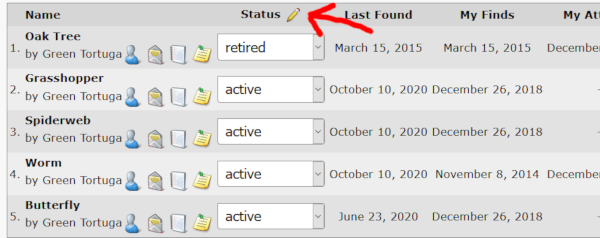
And finally, this next tweak allows you to edit a box, but from outside of the "edit box" pages. You'll find an option to edit the status of the entire series at once on the main details page of your box. Click the "edit" icon next to the "status" title of the series details section.


You'll then be taken to a page to select which status everything should be change to--as well as the opportunity to not include selected boxes in the update. Hopefully some of you folks with large series that need to be retired such as after an event will find this feature a huge help. =)

And that's about it for this update. It's a relatively minor update that I hope clears up some of the confusion and frustrations that were there before. =)

Happy trails!


Tuesday, July 28, 2020

How to List a Letterbox

So I created the newest video tutorial for Atlas Quest: How to List a Letterbox. Whether you're a letterboxing newbie learning how to use AQ or an experienced boxer who feels overwhelmed with the recent redesign of the add/edit box pages, you're bound to find a useful tip or two.

You might find some of the tips helpful for editing a letterbox as well since the processes are largely the same. The main difference is that when you edit a box, you aren't required to add a box name or type up front since those have already been added. Or you can watch the video to admire my relatively newly-shaved head. =)

Hope you get a lot of use out of it! Have more questions or comments or suggestions for future video tutorials, post a comment below! =)

Sunday, July 19, 2020

Video Tutorials!

So earlier in the week, it was suggested that I create some video tutorials--an idea which I absolutely LOVE! Even if for no other reason than I can talk to myself and not have anyone interrupt. =)

My first video was How To List a Bonus Box.


And today, you can learn how to use the trip planner! This describes a premium member perk so if you aren't a premium member, it won't be very helpful. (But if you want to see what premium members can do--maybe you will be interested?)

I'll likely be creating more of these over time.... have any requests? Comment below! Or on the message boards! Or email me. Or something.... I can't promise I'll make a video about every topic that's suggested, but I'll keep a list to work on.

Tuesday, May 21, 2019

The Biggest Update You've Never Seen!

Would you believe... I was looking for a letterbox?
So I took Atlas Quest down for about 20 minutes to complete a huge update on the website! Which... you probably won't notice anything different because absolutely nothing looks different as far as I can think of.

Much of the update involves upgrading software so, theoretically, things will run faster and better and more securely. Which involved updating the code on... well, all of my websites. I've been doing updates to them all: The Soda Can Stove, Backcountry Water, Ryan's a Total Goober, Walking 4 Fun, etc.

But those updates I could do with no downtime at all and absolutely nobody noticed anything different. =)

The update for AQ was a bit more complicated, however, which required a bit of downtime.

But there is one small update that's awesome! Okay, it's small-scale awesome--but it fixes one of those minor issues that has bugged me for years.

When you upload an image, it'll actually be right-side up! All of the time! =)

For a portrait-framed (vertical) photo taken with your smartphone--such as this one of me climbing a tree--it would invariably show up sideways when you uploaded it to AQ. It's been on my to-do list to update the clue page so you could rotate the image manually as needed, but until then, you had to open the photo in some sort of photo-editing software and re-save the photo (even though you might not have changed anything) before uploading the photo to make it right-side up.

But now it's no longer necessary because it should auto-rotate and appear right-side up without any additional input. Yeah! Just in time for the mass of boxes to be published for Plant-a-Letterbox day! =)

I should also point out... this will NOT fix photos that have already been uploaded and left in the sideways position. Only newly uploaded photos will be auto-corrected.

In other news, given how much has changed with this update, it's entirely possible that there are some bugs that have found their way in. If you stumble across them, let me know and please be patient as I try to get them fixed! Thanks!

-- Ryan
It's a bug! But please don't report this one.... This one was put here deliberately! =)

Tuesday, April 02, 2019

Auto-cryptograms are bigger and better!

Just kidding.... as most of you undoubtedly realized, the auto-cryptograms was an April Fools prank. Fun times, right? =)

As I write this, it's actually early February. I'm planning a trip to Jordan to hike the Jordan Trail and hopefully I'm there having a good time. I'll be there for nearly two months, however, through all of March and half of April and knew months in advance that I likely wouldn't be able to get online on April Fools Day to participate actively in the prank. So I set up the code to automatically start "encrypting" clues on April 1st (and only April 1st) and announce the auto-cryptogram feature... automatically. So the prank is all lined up to go before I even step foot in Jordan.

It'll be interesting to read the message boards and my AQ mail when I get online again! But like I said... I'll probably be in the middle of nowhere when this post goes live and when you read this, I'll probably still be clueless how of well the prank was received. (Or maybe it wasn't well received?)

Happy trails!


Sunday, March 31, 2019

Auto-cryptograms have arrived!

There have been.... complaints, I guess you could say, that there are too many drive-by letterboxes with little thought or effort put into them. Mostly thrown out in the wild so one can show they were there or get an "official" plant in a certain state, county or even country. And that's fine, but finders want something fun! Interesting!

And it really doesn't take a lot of effort to do so. Copy and paste a clue into about a million different websites and get an instant coded clue! Which everyone love to love! A pretty typical, forgettable box suddenly becomes an interesting puzzle that can gives hours of solving pleasure!

So I created an option to turn any clue into a cryptogram! This has the added effect of hiding the clues from search engines which, of course, is a good thing. There's nothing more annoying that someone who finds your clue from a Google search then tries to blackmail you for using a "trademark" without their permission or whatever.

But wait! There's more! Solving a cryptogram over and over again can get a little boring so I created several different fonts for cryptograms for a bit more variety. You can use normal letter replacements like usual... or! You can use letters from other alphabets. Want your clue to look Greek? Not a problem! Use the Greek alphabet! Want to make your spy-theme box look a little more spy-like? Use the Cyrillic alphabet and people will think it's a secret Russian message!

There are also options to make your clue look Chinese, but they don't really have an "alphabet" per se so it uses symbols in place of letters which represent words like honesty and integrity and... well, I don't remember them all anymore off the top of my head. I think golf ball was one of the words, though, because who doesn't like golf?

I also added an option for the Pigpen cipher if you want your coded message to actually look like a secret code!

I plan to add more options in the future--the sky's the limit here! Have any suggestions? I'd love to hear them.

To get things started, I went ahead and turned all the clues for drive-by boxes into cryptograms so at least there's a small challenge involved to find the boxes. Hope you enjoy them! =)


Thursday, February 14, 2019

Logbook Tweaking!

So some of you might have noticed that I took AQ down for about 15 minutes. Yes, it's the latest and greatest of updates! Actually, this update is pretty minor, but it was a lot easier to do the update while the site was down.

This update mostly involved the logbooks. The main goal this time around was to battle slow queries. There are a growing number of people with well over 10,000 finds to their names and AQ was struggling to show pages of those logbooks. It would literally take the database over 10 seconds to create the page showing the finds. If you clicked through to see page 2 of the results, it would take another 10+ seconds to generate. A website that "hangs" for over 10 seconds at a time is problematic! It's probably not a problem you noticed often because most people don't have enough finds to cause such issues and it's not very often that people look at logbooks for people with that many finds--maybe AQ would record half-dozen such slow queries in a day. But... it's a problem that grows increasingly worse as the number of people with large number of finds grow, and I was determined to fix it. As a whole, I prefer the pages on AQ to take less than 1 second to generate. (By comparison, most queries take about 1/1000th of a second to run, and even the slower ones rarely take more than half a second.)

So.... AQ's logbook now includes a dropdown list with years that you've found boxes and will show a list of all of the finds from that year. It runs a lot faster this way! It also won't paginate the finds. Whether there is 1 find or 5000 finds, they'll all be displayed. Which--if the number of finds is in the thousands is a bit unwieldy, but paginated finds were unwieldy already and good luck trying to figure out which page had a particular box you were looking for. At least with everything on one page, you can search the page with your browser to find a particular listing.

I figure that most of the time, people are interested in recent listings so the default setting isn't to show a specific year at all. Instead, it'll display the most recent 500 matches. Which means if you have less than 500 finds, all of your finds will be on that one page. If you have more than 500 finds, only the first 500 that match your sort will be displayed. But if you know the find was from last year (for instance), it might be easier to view the smallest list from last year.

The update was mostly meant to target the finds since that's where people have (literally) tens of thousands of entries which was causing the slow queries, but the same code runs the pages showing your plants, adoptions, attempts, carves, donations, etc. so the year option now shows up for all of them and the same rules applies. The logbook pages for exchanges, tracker signups, event signups, photo albums and.... why does it seem like I'm forgetting one? Anyhow, those non-box searches use different code and therefore don't have the year filtering option.

Make sense?

If you don't see the rows numbered, do a browser refresh. I updated the CSS and if your browser is using a cached CSS page, you won't see the numbers. Or ignore it and probably within a few days they'll eventually show up on their own when your browser refreshes the CSS.

Happy trails!

-- Ryan, keeping AQ running fast since 2004