Sunday, March 31, 2013

When 100 Years Is Not Enough

This icon looks grainy only because
I've enlarged it so much. But next
to your name, it'll look beautiful!
I've heard your complaints about the 100-year premium memberships. "Why only 100 years?", you ask "Why not 200? Or 500? Or a THOUSAND?!"

The love for Atlas Quest shows no bounds! And at long last, I've worked up a 1000-year premium membership. It's our best deal EVER for premium membership!

For just $999, you get all the same perks as the 100 year members—the ability to list finds on unlisted boxes, listing custom locations on any traditional letterbox on Atlas Quest, access to the Premium Members Only board, eight tag options, and the list goes on! Not only that, you'll have exclusive access to wear a blue feather on your hat.

And if you order now, while supplies last, you'll receive a free bonus gift from us—an official Atlas Quest baseball cap! Absolutely free! (Not including shipping and handling.)

And a second bonus gift—an autographed copy of Mr. Tortuga's bestselling West Coast Trail book: A Tale of Two Trails. Absolutely free! (Not including shipping and handling.)

But wait! That's not all! If you order in the next 24 hours, we'll give you all this—the 1000 year premium membership, the blue feather, the AQ baseball cap, A Tale of Two Trails, and more—for just $499! That's less than 50 cents per year of premium membership—our best offer ever!

Already a premium member? No problem! We'll add your 1000 year premium membership to the end of your existing membership! You'll never have to worry about renewing again! And, at the end of the 1000 years, if you want to renew, you're guaranteed to receive the same low-low price of just $499 for another one thousand years! Considering inflation, that's practically FREE!

A deal like this may never come again! And if you act NOW, you'll also receive five—yes, FIVE!—Atlas Quest patches and another five Wassa Eye Bleach patches for free! (Not including shipping and handling.)

So act now!

Baking Your Own Carving Block!

Marjorie turned out to be NO help AT ALL....
*shaking head*
Perhaps you've noticed the devastation our community has experienced due to the poor quality of pink stuff. A pink stuff shortage--at least a shortage of the good pink stuff--is a fate I would not wish on my worst enemies!

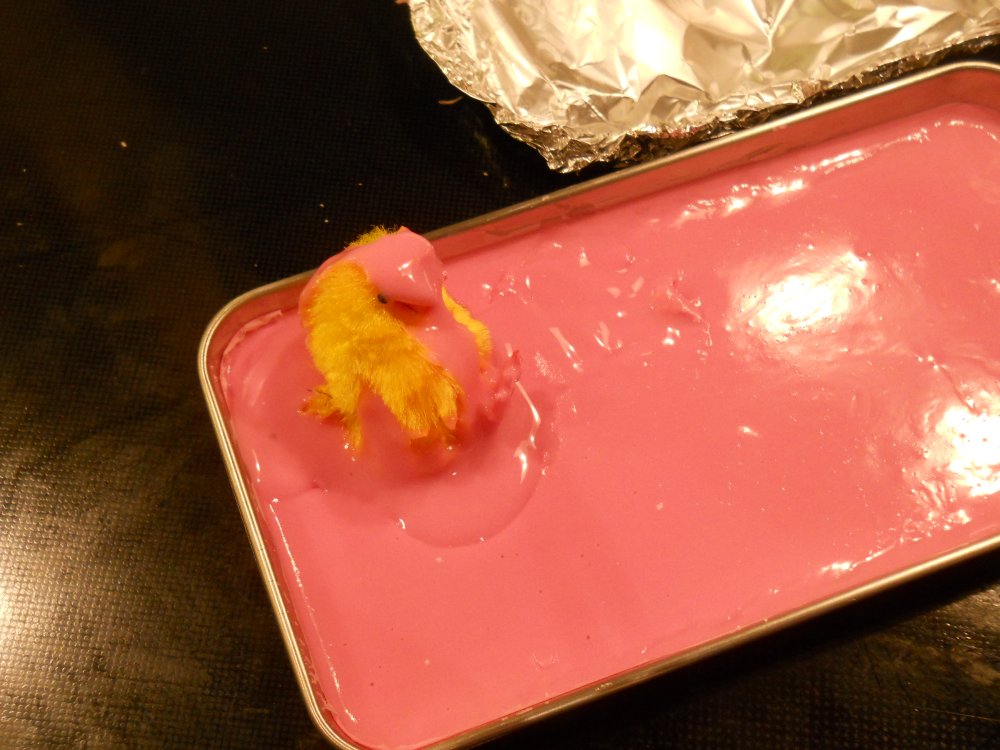
Well, I've got good news for you. About a year ago, I happened to learn that the pink stuff can melt. I won't get into that murky little story, but it got me experimenting. I started saving the shavings from my carvings and asking Amanda to do the same. I just didn't want to waste the shavings and figured it would be great if I could somehow reuse them.

It took quite a few months to get enough shavings to have something to experiment with, though. And I'd get one test before I needed to wait a few more months before I had enough material to work another experiment.

A painstakingly slow process, to say the least!

Then came the bad pink stuff. I bought some, and continued my experiments. And the results were surprising--after baking the pink stuff and it re-hardened, it actually carved a lot better and became less brittle!

Anyhow, at long last, the tutorial for baking your own carving blocks is up and ready for your viewing pleasure! Not only will you now have something to do with all those shavings from your carves, but you can turn that bad carving stuff into some quality material!

Let us know how yours turns out on the message boards!

Friday, March 01, 2013

The Windy City!

An unusual selling point for this coffee shop--fully clothed baristas!
So, as most of the folks in the Chicago area already know, I dropped by their S.I.L.O. #7 event a couple of days ago. =) First, before I get into that.... Apparently, some folks thought my rant the other day was about this event--let me assure you, it was most certainly not. Every box I saw listed was listed absolutely correctly. Now, I'm not saying that EVERY box was listed correctly because I didn't look up the listings for every box to verify this, but of the ones I did see, they were all listed absolutely correct as far as I could tell. The Chicago folks, in my opinion, set a fine example of exactly how personal travelers and event boxes should be listed. =)

I wanted to post about the Chicago adventures of Amanda and Ryan, though, and now I'm going to. =)

Amanda and I headed out Friday morning, at about 3:00 in the morning to catch our flight to Chicago via Phoenix. Things got off to a bad start, however, when Amanda went to put some of her luggage into the car and notice she had a flat tire. "Go back to sleep," she told me.

Considering that I only went to sleep two hours earlier, I was happy to oblige and went back to sleep. =) Amanda called AAA and got them to switch out the flat for a pint-sized spare.

We missed our first flight out of Seattle and finally left for the airport a few hours later.

On our way out of town, I had Amanda stop by a coffee shop so I could take a photo of their sign on the roof. I saw it during my walk the day before, but my camera wasn't working and I couldn't get a photo of it then. I didn't know how long it would stay up there, so by golly, I took the photo while I could. =) There's a coffee shop in the Seattle area who had some baristas busted for doing more than serving up coffee--and this coffee shop put up on their message board that their coffee is full-flavored, and that their baristas were fully-clothed. It's an usual selling point and I wanted a photo of that! =)

We made it to Phoenix without any additional trouble, but our flight from Phoenix to Chicago was hit with weather delays. Apparently, the weather in Chicago had much to be desired and the air controllers weren't allowing flights to their non-fair city. So we muddled around the airport. I walked around the terminal a bit in an attempt to gather 10,000 steps on my pedometer. Since I started working on Walking4Fun.com, I've been carrying a pedometer, and I've done at least 10,000 steps every day since December 1st. Now I'm feeling kind of compelled to keep up the streak. So I left my bags with Amanda and walked up and down every concourse in the terminal. =)

Riding the "L" into Chicago
Finally, our flight departed, almost three hours late, and we were on our way to the Windy City!

Our arrival, about six hours later than we originally planned for, meant it was already dark so we headed straight to a hotel for the night. And wow, was Chicago cold. Temperature gauges that we saw seemed to hover around 20-22 degrees. Not to mention the layer of snow on everything. And--get this--all of the locals seemed to think it was GREAT weather! Hahahaha! =) Our hotel was located north of the city, about six miles from the event.

I usually let Amanda plan all these trips of ours--she's a serial planner while I'm more of a go-with-the-flow kind of guy--and she booked us on a gangster tour through Chicago--so the next morning, we headed into the city. We parked at the end of the red line and took the "L" into town.

Lunch at the Weber Grill! Giant grills included. =)
It started off well enough, but things went unexpectedly haywire when the train decided not to follow the red route. I still have no idea why. Even as the train continued on to stops that clearly were part of other colored lines, it would make announcements continuing to insist that we were on the red line. It started following the brown line stops--in reverse. Then the doors would open and the announcement, "This is the red line train to XYZ...." would start. I'd shake my head at Amanda. "It's still insisting we're on the red line!"

So it didn't get us to the stop we had planned on, but it got us into town. We pulled out our map, got our bearings, and started to walk in the direction of the start of the gangster tour.

Having arrived early, we made a couple of slight detours to see the rocks of the Tribune Tower. There are rocks from historic locations throughout the world embedded into the lower level of the building--including the White House, the World Trade Center in New York, the Great Pyramid of Egypt, Westminster Abbey, etc. A total of 136 rock fragments, and Amanda and I tried to find how many we had been to.
Who can't love a statue like this one? =)

Then we stopped at the Weber Grill, where everything with cooked with giant Weber Grills. Surprisingly, Amanda had never eaten here before. I was surprised because it sounds like just the kind of thing she would have enjoyed and she's been to Chicago a heck of a lot more often than I have!

And then it was to the rock 'n' roll McDonalds where our gangster tour started. That was fun. =) They drove us around in a bus showing us where serial killers used to run amok, took us off the bus to show us bullet holes in churches from the 1920s beer wars, and--of course, no gangster tour would be complete without a visit to where John Dillenger was gunned down by the FBI and where the Saint Valentine's Day massacre occurred. (The building where that occurred , however, is no longer there.)

By the end of that tour, the sun was setting and we worked our way back to the car following the red line to its end (and this time, it stopped at all of the stops it was supposed to!) and back to the hotel.

OMG! It's the rock 'n' roll McDonalds!
Stop... tickling... me.......

The next day was the big day of the event, and Amanda found a bike path that I could walk on that would take me most of the way to the restaurant of the event. So she dropped me off a few miles away--I would have walked all the way from the hotel, but I wouldn't have made it to the event in time if I did! And I worried the several inches of snow on the ground might slow down my usual quick pace.

The entire restaurant was filled with letterboxers!
(This is just one small section of the restaurant, I might add.
There's a lot more, but I couldn't get it all in one photo!)
I can't say enough nice things about the people I met here. They all made Amanda and me feel incredibly welcome! Thanks to Beetle for organizing the event, but I didn't actually get a photo of her. (FungusWoman, however, did upload a photo of her talking to me to the event's photo album.)

Tat2bob, I have to give special credit to, since he not only broke his leg while letterboxing (at least that's the story *I* heard!), but that didn't slow him down from coming out to the event either.

You can't be too careful when you're around a group of letterboxers....


After the stamping frenzy had come to an end and our meals were finished, everyone went off in their own direction. I decided to walk back to the hotel which had me stomping through snow late into the evening. I didn't make it back to the hotel until well after dark, which wasn't always easy when you're on unfamiliar roads, in the dark and without any maps. =)

But I survived. The next day, Amanda and I headed back to the airport, our adventures at an end. We did pick up a few cemetery boxes on our way back to the airport, then we flew together to Phoenix before we parted ways. Amanda continued to Seattle while I flew out to San Luis to visit my mom and get a badly-needed haircut. =)

And finally, I'm now back in Seattle, nearly a week after I left it. Back at work, and making (and breaking!) things.... =)

Thanks again to everyone who welcome Amanda and myself to Chicago! We had a blast!

Monday, February 25, 2013

The Letterboxing Police Are Out To Get You

There aren't a lot of rules on Atlas Quest, but there are a few of them. One, for instance, is that you are expected to follow any land manager policies when you plant a letterbox. It seems like a reasonable rule to follow. As letterboxers, I think we should project an image of responsibility and understanding to the rest of the world. We want land managers to support us, and respecting their rules and permit systems, annoying as they might be, is part of this.

For instance, the folks at Disney World have made it very clear that letterboxes are not allowed on their property. Don't complain to me that you don't like this rule--I didn't create this rule. But I will enforce it. I've posted here about that mis-adventure in the past, and I'll likely post about it again. The folks you need to talk to work at Disney. Get them to approve your box and you'll be able to list your boxes here. So hop to it. You probably won't succeed, but that's the only way I'll allow boxes to be listed at Disney World, period.

Another thing that's a big annoyance for people are boxes that are listed improperly--usually event boxes or personal travelers that get listed as traditional boxes, or multiple stamps in the same box being listed individually. These kinds of things clutter up search results and they will be fixed as they come to our attention.

Whine, cry, plead--it doesn't matter. The rules are quite clear--I write them directly into where boxes are added, and I'm not very sympathetic to those who can't or refuse to follow rules. If you don't like the rules, there's another letterboxing website you can use. However, they do have their own set of rules, so you'll need to be careful to follow their own rules.

As a whole, AQ is set up on the honor system. I happen to like the honor system. I'd like to keep the honor system. However, if this is too big of a burden to bear, there's another system that can be implemented. That's how the main geocaching website works: You need to get your boxes approved before they'll be added to AQ. This would help solve a lot of problems with incorrectly listed and deliberately disrespected land manager policies, but I will implement such a system if I feel it becomes necessary.

I don't care if you try to justify invalid listings by pointing to examples of incorrectly listed boxes. Being an honor system, there are people who will take advantage of that and plant boxes legally and incorrectly, and admins will "fix" these listings as they come to our attention. But just because some of them slip through does not make it okay or justified for you to do the same. It's a weak argument, and the kind of excuse a grade school student would give. "But Miss Marple, Jimmy beat up the kid yesterday, so why shouldn't I be allowed to do so today?" Sounds absurd, don't you think? It happens a lot when it comes to incorrectly listed boxes, though, and I'll say this right now: It's not an excuse that will work.

So let's review:

* If you want to plant a box somewhere, check the Land Manager's Policies on letterboxing. You are expected to follow them, and if you do not, your box may be deleted with little or no warning at any time if it comes to the attention of an administrator.
* A traditional letterbox is one that is hidden and requires clues for most people people to find. The clues do not have to be listed on AQ to count as clues, and statements such as "look on the table" and such do not count as clues since most people will likely find those boxes even without your half-hearted clues since the boxes aren't actually hidden.
* An event box is typically left out in the open--usually at events--that anyone who happens across is welcome to sign into and stamp. These may or may not have clues involved. Usually, if they have clues, it's because there's a lock or some sort of trick to access the stamp, but the box itself isn't actually hidden. (Hidden in "plain sight" does not count as "hidden.")
* A personal traveler is typically kept in your possession at all times and people who want it must find you in order to acquire the box. These often do have a clue--some sort of requirement before you can stamp in.
* Atlas Quest supports boxes, not stamps. From a practical standpoint, I don't bother wasting my time enforcing this rule for anything except traditional boxes, but technically speaking, an event box with multiple stamps should only be listed on AQ as one box. I know darned well that most people list every stamp in the box, and while I don't enforce this rule for event boxes (for now), I think it sets a bad example for traditional boxes (which I will enforce), and  if the day comes when I do decide to enforce this rule, as long as you're following the rules, it's not something you'll have to worry about in the future.
* Do not list boxes publicly that have not yet been planted. It clutters up the search results with boxes people can't find and such listing can and will be deleted as we come across them. There is a special type called reserved that you can use to "pre-list" boxes ahead of time. This keeps them out of the search results of other people until the box is ready to go live.
* If you create an event stamp that you later use as a traditional box or vice-versa, or a personal traveler that sometimes works as an event box, or whatever variation of the "it used to be X and now it's a Y" type of box, the proper way to list these types of situations is to list every type of box it was used as so people can record the type of box that they actually found. List it as both a traditional box and an event box (if that's what they were), so people who found it as a traditional box can record it as a traditional box and those who found it as an event box can record it as an event box. And retire the type that's its no longer being used as--obviously, both an event box and a traditional box can't be active at the same time, and they shouldn't be.

Follow these rules. If you see friends who aren't following these rules, encourage them to do so. If these became a big enough issue, I will implement options so all new listings will require moderators to approve all new box listings--and I don't think anyone wants to see that happening.

Saturday, February 09, 2013

Photo Quality

Before
As most of you have probably noticed, I've been working on a new website, Walking4Fun.com. Creating this website from scratch went a heck of a lot quicker than creating AQ from scratch, and one of the reasons is because I use a lot of the same code on both websites. In fact, all of the core, generic code is the same for all of my websites--which includes TheSodaCanStove.com and a new website I've been developing for a pizza place. (That one isn't up, however, so I'm not posting a link to it.)

Code reuse is a wonderful thing because it makes development go faster. And if I find and fix an error in one location, the fix magically works for all of the other locations as well. Or if I add a new feature or improvement to this core code, all of the other websites can also benefit from it.

Consequently, you mind notice some "cross-pollination" between websites. Work on one invariable causes improvements in the others.

And today's (admittedly small) improvement on AQ comes from Walking 4 Fun. For those of you who haven't heard about it, it's a site that allows you to virtually hike the Pacific Crest Trail and Camino de Santiago. You track how much you walk each day--around town, around the office, and wherever your feet should carry you--then enter it into the website at the end of the day. It'll show where you would be on one of these famous trails had you done your steps on there, along with photos of all of the places you would have passed that day. It's not easy to see how far a mile of walking here and there can really add up, but you'll see it on this website.

After
So I wanted to create a promotional kind of link that would display one image among the thousands that are on this website--along with what trail it came from and where on the trail it was taken. (This is working now--that's what you see at the top of the right-hand column of this blog post!)

Not a big deal--just a bit of graphic manipulation.

During the process, I needed the photo shrunk down from what was on the website, and I had conveniently already created a function in the core code that could do this. I pass in the photo, the maximum width or height I want it to be, and it returns the properly resized image.

The first issue was that I found a bug. The returned image was smaller, but it wasn't the correct size. I found the error and fixed it, and the fix went up on AQ as well. It was a relatively minor bug, though. Not something most people would notice. (Heck, *I* didn't even notice it until now, and I've been using this code for years!)

The other thing that bothered me was that the code depended on a function call for the actual process of resizing the photo that wasn't very good. If you good a super high resolution photo and shrunk it down a lot, it looked pixelated and ugly. I didn't really know of a good way around this problem, though, and just lived with it.

Well, in the process of working on this feature for Walking 4 Fun, I was scrolling through a list of functions available to manipulate images and discovered that there was a different option available to resize photos--and this one smoothly interpolates pixel values which is what I've always wanted the resize to do! It just looks better!

So I updated the code to use this new option instead and tried a few test images on my development machine--some uploaded with the old function and some uploaded with the new function. And without a doubt, the new stuff looks so much better!

So I've worked the update into Walking 4 Fun, AQ, and the pizza website. (It also works on the soda can stove website, but there aren't any images that I manipulate programmatically there--not at the moment, at least!)

What's this mean for you? Well, not much for the most part. Images uploaded as clues, signature stamps, or event photos will generally look better now. Old images still look blocky and pixelated, though. If you have some older images that have this problem, try uploading new images to replace them with.

In the past, I've always recommended that you "pre-shrink" your photos down to at most 1,000 pixels to a side to help reduce that pixelated look, but with this update, that no longer applies. The maximum file sizes haven't changed so if you take some really high-resolution photos, you could still hit that limit and might need to shrink down the photo to a smaller size anyhow. But that's just a file size limit--not a quality control issue which was where my recommendation originally came from! =)

There are some more tricks and techniques I learned while working on Walking 4 Fun, but those haven't made their way onto AQ as of yet. They will, though... There's definitely more coming down the pipeline! But I'm pretty excited about the dramatic improvements in photo quality. =)

The photos at the top of the blog post are of me with Nancy, MaryK, and Jeannie at the train station in Santiago that I did some of my tests with. The original file was 4000 pixels across and 3000 pixels tall, and I wanted to see how it would look of AQ shrunk it down to a "standard" image size that had a width of 300 pixels--over 90% smaller than the original file. The first photo was how the old code shrunk the file, while the second photo is the newly updated version of the code. You might have to get your face really close to the monitor to really see how bad that first photo is and how much better that second one is, but the difference is remarkable!

AQ would also create thumbnail images for every uploaded file and those were a maximum of 100 pixels to a side--a whopping 98% reduction in size! The difference in quality is even more stunning!

Before
After

Thursday, January 03, 2013

When spammers attack!

If you logged into AQ this morning, you might have received a "spam attack." They happen on occasion, but fortunately not often. I thought y'all might be interested in what happens on our end of things when spammers attack!!!!

If you ever do get spammed on AQ though the AQ mail system, use the "Report as Spam" button. It's located immediately below the message, on the right.

When you use that button, this is what happens on our end of things--and the reason us admins are do darned fond of people using that button. It makes our job to managing spammers a lot easier and faster!

The first thing that it does is alerts us to a spam problem. It does this by creating a giant button with bright red letters in the upper-left corner of the page for us. It's all but impossible for us to miss this. It doesn't matter what we're doing on the website--reading message boards, AQ mail, listing boxes.... It's a hard button to overlook! And it's not just something that I see--but all of the admins on AQ will see it until the problem is handled. Here's what it looked like when I got to AQ this morning:

The spam alert jumps into action!

So before I even read a single message board, before I read a single AQ mail, before I knew anything else, I knew there was a spamming issue that I needed to investigate.

When we click that button, we get all sorts of information about the reported spam and spammer!

The spam report. Click on this image to see it in full size--I shrunk this
view to better fit on the blog.

The top of the page starts with the "spam summary"--a list of all of the reported spam. I can immediately see that there have been nine spams reported (actual spam counts are usually much higher--most people don't report spam at all!), all messages from the same person, all with the same subject, and all sent within a half hour of each other. It also gives me links to examine a specific spam report (by default, it'll show me the most recent report, but clicking on the report number allows me to see other reports), and a link to read the spam if I felt it was necessary.

Below that is the actual AQ message that's being reported as spam. By default, it shows the most recent report--at the time I logged in, it was a spam sent to (and reported by) Road Junkies. And, looking at it, I agree completely--definitely a spammer at work. (I blurred out the email address--no reason to give the spammer the satisfaction of having their email address more widely distributed!)

Below that, it gives me more information about the spammer including other messages they've sent recently (likely more spam that hasn't yet been reported), account information (spammers are often  new members with little or no information on their account), the IP addresses they've used recently (this one is from Dakar, Senegal--one of the biggest sources of AQ spammers), and their most commonly used IP addresses (which, in this case, is the same as their more recently used IP address).

In this case, everything all matches up--spammer through and through.

AQ tends to suffer from two distinctly different types of spammers. This is the first kind. Someone, usually from Senegal, creates an AQ account and immediately starts firing off spam to as many people as they can get away with on AQ.

The second kind are from genuine members of AQ who've had their email account hijacked. Since it's possible to send AQ mail through their email system, these spammer will send a message to everyone in address book of the hijacked account--including to AQ members. In this case, there usually aren't very many spams--perhaps four or five typically--since the spammer only knows people from the address book of the account they hijacked. Or rather, only four or five sent to AQ. Their address book might have hundreds of email accounts, but only a small handful lead to AQ and there's nothing I can do about the others in any case.

In each of those cases, how to handle the spam is very different. The first guy, I just don't want on AQ all. Ban their IP address, freeze their account, delete every AQ mail message they've ever sent, etc. The whole shebang!

In the second case, when the spam comes from a legitimate member of AQ but through a hijacked email account, I won't ban the IP address or freeze their account, but I will delete all of the spam and remove their email address from their account. Since AQ only accepts mail from "known" email addresses, by removing their email address from their account information, their email address becomes "unknown" and AQ refuses to accept anything coming from their account. Then I'll send them an AQ mail to tell them their email account has been hijacked and they need to get control over it again before they add their email address to AQ again.

That's a lot of stuff to do manually, though, so I made it easy for us admins to handle such situations. Below the spam report, it gives us options:


The three main things for me to worry about are what to do about the IP address, what to do about the AQ mail they sent, and what to do with the spammer's account. By default, the actions won't do anything. I don't want to accidentally go banning IP addresses by accident! But I did write some code so AQ can try to determine what kind of spammer is involved and even include suggestions about how to handle the spam. In the spam event of this morning, I agree with the suggestions of banning the IP address and deleting AQ mail from within the past 24 hours (which happens to be all of the AQ mail they've ever sent since their account wasn't even 24 hours old).  And I wanted to freeze the account, so I clicked those options, clicked "action", and with that click of the button, I blocked the IP address, deleting all the AQ mail they ever sent (at least from AQ's servers--forwarded AQ mail to real email addresses I can't do anything about), and froze their account.

You might be a little curious about all of those different options under "Delete AQ Mail." The main reason there are so many options in that category is because of hijacked email accounts. Hijacked accounts have usually sent legitimate AQ mail in the past, which I don't want to delete. So I have a few options to try to filter the gems from the dirt. Most of the time, spam was spent recently, which is why there are the "24 hour" limits. Older messages that haven't been flagged as spam usually aren't.

Spammers also tend to use the same subject and/or message over and over again. Generic form letters. It's not worth their effort to hand-craft personalized messages when you want to spam hundreds or thousands of people! If for some reason spammer emails have been mingled in with legitimate AQ mail, often times I can target any message with the same subject as the reported spam, easily deleting just the spams and avoiding the legitimate messages.

And, if a spam appeared to be an isolated incident, I can delete just that message and no others.

Once I've handled a spammer and deleted all of the spam they mailed out, my spam report automatically figures that out. So although nine people actually clicked that "report as spam" button this morning, I don't have to wade through eight more reports after that. The other eight that had reported a spam problem had been taken care of at the same time, and AQ is smart enough to realize that causing the "spam alert" button will now go away.

From the time an admin logs in and sees the spam alert, it can take mere seconds to process and ban the spammer's IP address, delete all of the spam, and freeze their account using this little setup. I actually spent the better part of a week working on this feature--one of those little things that you guys will never actually use yourself, but which you all benefit from since it makes things a lot easier and faster for us to deal with rouge spammers.

By comparison, when you forward spam to me or report it on the message boards, this is what likely happens:

* I usually read message boards before AQ mail, so I might be reading them for several minutes before I notice a post about spammers. There's no way for AQ to bring such a message to my attention. If nobody has posted about it, it might be even longer before I got to my AQ mail and notice a message about a spammer there. Eventually I'll get the message, but it'll certainly take a lot longer!
* When I do finally get the message, there are admin tools I've built that allow me to look up information about the spammer, freeze their account, delete their messages, etc., but they aren't integrated into a single, easy-to-use page. So I actually find it faster and easier to log into the account of the person who reported the spam, click the "Report as Spam" button myself, then log back into my administrative account and actually handle the problem as seen above.

Consequently, I'm big on pushing the use of that "report as spam" button. You'll get results faster--more people will get the report (all admins, instead of just Wassa or myself), it's much more obvious to us than other ways of reporting spam so one of us will likely notice the problem sooner, and it's a lot faster for us to handle through that integrated spam-handling page.

So there's your little behind the scenes tour of what happens when a spammer is found on AQ. I hope you enjoyed the tour and maybe learned a little about how things work! =)

Wednesday, December 19, 2012

Favorite Searches

For those of you up late last night, you'll have noticed that I shut down AQ for a bit to upload a new update for the website. Most of the tweaks are pretty small and not really worth mentioning. But there's one change you might not notice if you don't look at your list of favorite searches, so let me tell you about it. =)

However, this is a new premium member feature, so if you aren't seeing it, that's probably why. Check out your Favorite Searches. Assuming you have at least one in which you are receiving notifications, the new option should be readily apparently. You can now specify whether you want to be notified of "new boxes" or of "new and modified boxes."

AQ doesn't really track what is modified on a box listing, so it won't tell you that. It just keeps track of when the last time a box was modified, for whatever reason, and if one matches your search and the last modified date is more recent than the last time you got notifications, you'll be notified of the changed listing.

But also keep in mind--you'll only be notified of the changed listing if the box still matches your search! For instance, if someone changes a box status from active to retired, you probably will NOT get notified of that change since most searches are set to hide retired boxes. In this case, the change causes the box to no longer match your search and therefore the notification of the change won't happen.

On the flip side, however, a box that had been retired but was replaced might have its status changed to active. The old listing might not have matched your search since it was retired, but the modified listing now will match your search so you will get notification of that change.

So this feature is not a replacement for the 'watch' feature. They work very differently! But keep in mind that the results may not be as intuitive as you might first expect. It does have some advantages, though. It can notify you whenever someone updates the clues on their box, or when retired boxes are brought out of retirement. Just remember, though--it will probably not notify you if a box is retired (unless you explicitly mark your search to include retired boxes), nor if you suddenly meet a restriction for a box that you never met previously.

Enjoy!

Wednesday, November 07, 2012

2013 Calendars Have Arrived!

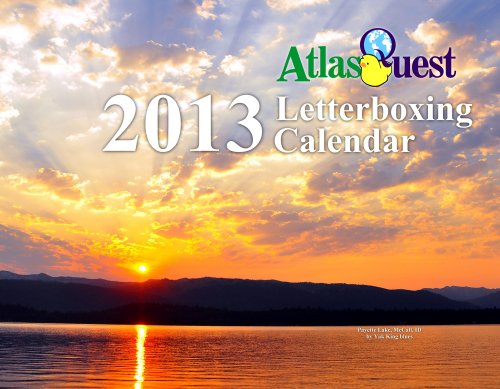
The calendars have arrived! The calendars have arrived! =) This year's cover features a sunset (or what it a sunrise?) by Yak King blues over Payette Lake in Idaho. Nice, don't you think? =)

You can take a look at all of this year's photos at http://www.atlasquest.com/marketplace/calendar/samples/2013/ -- we've got fungi, and boats, and turtles, and pelicans, and trees, and caves--it's a fine looking calendar! Perfect for home, work or as gifts for the holidays. =)

If I've used one of your photos, you've got a free calendar coming your way. (You'll be hearing from me through AQ mail soon!) If you want a free calendar next year, be sure to get your submissions in for Project X! It's never too early to get your photos submitted before you misplace them or forget you even took them!

If you don't have any photos to submit--what are you waiting for? Get out there and start taking them! =)

Thanks to everyone who submitted photos this year and made this calendar possible. I'm still amazed at the wonderful photos y'all submit every year!

Monday, November 05, 2012

A Tale of Two Trails!

A lot of you already know about the book I wrote--A Tale of Two Trails. I actually had it published while I was off hiking a thousand miles from Le Puy-en-Velay to Santiago and therefore had a little trouble actually acquiring copies to sell on AQ. So I generally directed anyone who was interested in purchasing the book to Amazon.com.

I didn't actually get to see and touch my first copy of the book until after I finished my hike! And still, I had no copies available for sale on Atlas Quest.... I put in a bulk order, though, and told them to ship it on the slow boat from China (actually, it's made in America!) to save on shipping costs. Well, this afternoon, the box of books finally arrived and I'll be selling autographed copies through the AQ Marketplace. =) Shipping is just $1 regardless of the number of copies you choose to purchase.

I'm not sure how many of these I'll sell so there is a limited supply, but I will order more if I run out. (You might have to wait a few weeks before a new shipment arrives, however.)

So.... what is this book about, you ask?

Back in 2009, I hiked the West Coast Trail and Juan de Fuca Marine Trail in Western Canada, this this is the story of my hike along those two trails. It's a short book--a mere 87 pages--but in it I chase after helicopters on foot, darned near kill myself and look for drug smugglers and shipwrecks along this beautiful and deadly coastline. =)

And if you enjoy it, leave a nice review on Amazon.com. It would be nice to have at least one or two good reviews there. And if you don't enjoy the book, well... remember what your mom said--if don't have anything nice to say, don't say anything at all. ;o)

Thursday, October 25, 2012

Updates! Updates! Updates!

Now that I'm not hiking the Camino anymore (what, you didn't get that memo?)--I'm back at work on Atlas Quest. I've been uploading tweaks and improvements all week long. Have you noticed any of them? They're relatively minor, but so far, nobody has posted about them on any of the message boards. Have none of my updates been noticed yet?

Anyhow, tonight I wanted to make an update that required me to take AQ down for several minutes. The updates are in and the site is back up again. Can you find the changes? =)

I'm not going to post about them here, though. Nope. I'm going to let y'all look for changes. If you find any, go ahead and post about it! On the message boards or on this blog--it doesn't matter to me. None of the changes are particularly noteworthy or announcement worthy, and they're all pretty self-explanatory, so when you do find them, I don't really have to explain what it's for.

So instead of announcing the changes--I'm just announcing that there are changes to be found. And more in the works. Keep your eyes open!