 |
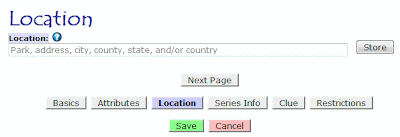
Exhibit A: When you first go to add a location to a box,
you'll see a page like this one. |
I've been meaning to post about this ever since that Big Update, but I kept making tweaks and changes and didn't want to post a long explanation then have the information change a few days later. It seems stable enough now, however, and I don't expect any significant changes in the near future anymore. So, at long last, here's a little information about adding and editing locations.
First, I'd like to note that these instructions apply anywhere you can add or edit locations, whether it's letterbox locations, event locations, virtual locations. Whether it's a custom location for yourself that can override the owner's listed location or whether you're listing the locations that others will see--all of this revolves around the same core piece of code, so they all work identically. Since the vast majority of locations are associated with letterboxes, however, I'll refer to those. Just know that this information applies to events and virtuals as well.
Now, let's take a look at Exhibit A. That's the kind of page you'll see when you first have to enter a location. Ours is empty since we have yet to add any location information, but we'll fix that. The important thing to remember about this page is that it's the geocoder page. A geocoder, to refresh your memory, is a system that converts an address or other human-readable location into latitude and longitude coordinates. Anything you type in here will be run through one or more geocoders in an attempt to figure out precisely where your location is.
 |
| Exhibit B: Let the geocoder chew on Seattle, WA. |
Also note the small question mark in the blue circle next to the word 'Location.' Whenever you see that icon, clicking on it will take you a relevant entry in the help pages of Atlas Quest. If you're not sure about something, that's always a good thing to check.
So let's type in a location. Because I live in Seattle, we'll use that, and I type in "seattle, wa" because I'm too lazy to capitalize properly. =)
When I click 'Store', the text is sent to one or more geocoders, and it returns the following results:
 |
| Exhibit C: The geocoder results. |
Now this is pretty darned cool! (At least I think so!) The geocoder found one result that it believes matches your location--a town called Seattle, located in King County, in Washington state, which is located in the United States, and even plots a map marking the location so you can verify it's latitude and longitude coordinates.
This is the best case scenario. It's exactly what we wanted, and we can click the 'Next Page' button and continue adding details about our box.
Unfortunately, the results aren't always this clean. Sometimes, the geocoders might find more than one location that appears to match your location. For instance, if we try searching for the location named "Portland", we'll get these results:
 |
| Exhibit D: Wow, there certainly are a lot of Portlands out there! |
The geocoder returned
seven possible matches! This isn't even the complete list of Portlands--these are just the ones that the geocoder thinks are the most likely ones that you are referring to, sorted roughly in order of size from largest to smallest under the assumption that you probably are referring to one of the largest Portlands.
In this case, Portland, Oregon, gets first billing, and Portland, Maine, gets the second billing. Those two are also the two that most people can name right off the top of their heads, so it's nice to see that the geocoder gave those two the two top slots.
The numbers in the list correspond with the numbered markers on the map, so we can easily see their relative locations. Assuming we wanted to use the Portland in Maine, we can get there either by adding Maine to the text box to narrow down the result, or by clicking the second item in the list. I click the second item on the list then "Store," and wind up with this view:
 |
| Exhibit E: Portland, Maine--there you are! |
This is great--we're right where we want to be and it's time to move on to the next page of listing our letterboxing.
That was mostly a contrived example--I knew that there were a lot of Portlands and could force that "error" to happen. Here's a real example that I fell into purely by accident:
 |
| Exhibit F: A real-life scenario of multiple matches when I tried entering a location for "cerro san luis, san luis obispo, ca." |
When I tried this search, the geocoders came back with three possible matches, all of which are located in the city of San Luis Obispo. Looking at the map, I can clearly tell that the one I was looking for--a prominent and popular mountain in town to hike up--is the #2 option. My search was for "Cerro San Luis," but the
official name of the mountain is Cerro San Luis Obispo. My bad--I typed it in wrong. We do that a lot around here--shorten San Luis Obispo to San Luis. The geocoder also found an apartment complex on the Cal Poly campus named Cerro San Luis, though, as well as a street in town named San Luis Drive. I wanted the mountain, however, so clicked on the second option and continued with the listing. All is well! =)
When Geocoders Fail
The worst situation is when the geocoders can't figure out your location at all. Take a look below at Exhibit G.
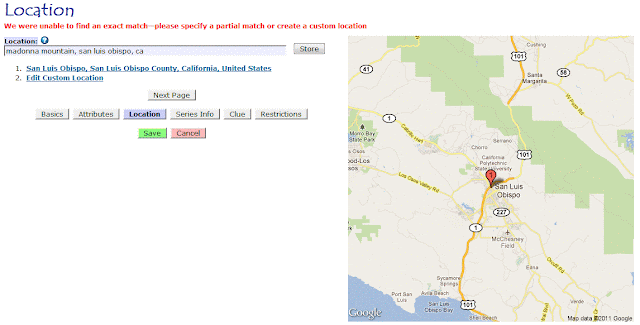 |
| Exhibit G: The geocoder failed to find our location |
In this case, I tried entering a location for "madonna mountain, san luis obispo, ca." The geocoder, however, was unable to find this. There's a good reason that the geocoder can't find this location--officially, it doesn't exist. Madonna Mountain is a name that many locals use to refer to Cerro San Luis Obispo. In fact, most people call it Madonna Mountain. There's a giant M on the mountain (which many people assume is for Madonna, but it's actually short for Mission), and the mountain has been owned by the Madonna family for decades and decades. (No relation to the pop singer.) SLO is famous for the world-famous Madonna Inn, along Madonna Road, right next to the Madonna Inn, and with a giant M on the mountain, it's understandable that people would tend to call it Madonna Mountain. BUT--officially--that's not the name. (After the owner, Alex Madonna, died a few years ago, there was talk about making that name official, but so far, nothing has come from it.)
The only time you usually see Cerro San Luis Obispo (or Cerro San Luis) used is in newspapers and other media that like to be officially correct in such matters.
But long story short, the geocoders were unable to figure out where Madonna Mountain was located because it officially doesn't exist. AQ was able to match the
city where you said the mountain was located, and it gives you that as an option, but if you want to pin-point the location better than that, you have two choices:
- Use the official name of Cerro San Luis Obispo (assuming you knew that to begin with, though, why didn't you just use that as the location?)
- Create a custom location
We already reviewed how to add Cerro San Luis Obispo as a location, so let's add Madonna Mountain as a custom location this time. =)
Adding Custom Locations
To get out from under the geocoders, which clearly have no idea what Madonna Mountain is, click that "Edit Custom Location" link at the bottom of the list. That's your 'escape hatch' from the geocoders. I click it, which takes us to Exhibit H:
 |
| Exhibit H: We've escaped the geocoders into the Custom Location page |
The custom location has already been pre-filled with information from Exhibit G. In this case, it's information about the
city of San Luis Obispo. A lot of the information will be the same for Madonna Mountain because it's in the city, but we do have to tweak this information specifically for Madonna Mountain.
Most of this page is self-explanatory. The name of the location we want to add is "Madonna Mountain," so we enter that as the "Park Name, Business Name, Etc." section. I don't have an address for that mountain, so I'll leave that blank. (If you know the address for the trailhead, however, it might be a good thing to include.) The city, county, state, and country area already correct, so I'll leave them be.
The coordinates are pretty straight-forward. The peak of Madonna Mountain, which I can look up from
Google Maps, is at 35.282741024156, -120.68038151502. (If you have a GPS, you could also have recorded this information when you planted the letterbox.)
Then there's the radius. This is entirely new since the update. AQ now tracks the relative sizes of a given location. A park is usually much smaller than a city, and a city is usually much smaller than a state, and a state is usually much smaller than a country, and now AQ knows this! Which is very useful information for providing accurate search results.
There's a lot of information about the radius if you click the 'help' link for radius, but in a nutshell, it's the distance from the center point of your location to the outer edge of your location, as the crow flies. Assuming your preferences are set to use miles, the distance is in miles. (If your preferences are set for kilometers, you'll have to enter kilometers instead.) The only way to figure this out is to pull out a map--real or online--and measure the distance. For Madonna Mountain, the radius is 0.681 miles.
 |
| Exhibit I: Adding a custom location |
When I'm done, I click 'Store', and AQ takes me back to the geocoder page, displaying my custom location:
 |
| Exhibit J: Madonna Mountain, our custom location, now supported by the geocoders. |
And we're on our merry way again.
Adding a custom location can be a bit of a pain--figuring out the coordinates and radius and all that--and if you can make a location work without it, it'll save you a lot of extra effort.
And that's it for now. There's a lot more I want to talk about on that custom location page, but I'll save that for another day.....